



SPECIFICATIONS
Brand Name: Ammtoo
Application: Desktop, Laptop
Keyboard Standard: Mini Keyboard
Style: Mini
Operation Style: Mechanical
Type: Wired
Interface Type: USB (Type-C to USB)
Language: English
Backlight Type: Multicolor
Switches Hot-Swap: Yes
Battery Included: No
Package: Yes
Origin: Mainland China
High-Concern Chemicals: None
Choice: Yes
FEATURES
Mechanical Operation Style: Provides a tactile and responsive typing experience.
Multicolor Backlight: Adds a stylish look and improves visibility in low-light environments.
Custom Programming: Allows key functions to be customized according to your needs.
Dedicated Photoshop Keys: Includes three preset keys for Photoshop, enabling quick access to commonly used commands.
Macro Keypad: Supports macro programming for improved workflow efficiency.
Mini Size: Compact and portable design, easy to carry and ideal for limited desk space.
PRODUCT DESCRIPTION
This mini mechanical macro keyboard supports custom functions and features a Type-C to USB interface. It requires no driver installation and supports plug-and-play operation. Button functions can be fully customized based on user requirements, making it ideal for productivity, design work, and gaming setups.


If you are unsure how to download the software, please follow the instructions below:
-
Software Download Link:
https://drive.google.com/drive/folders/1xqFDp-l5TVA_6Ojsn0rt7GqvF5EvWDCi?usp=share_link -
Open the link and follow the on-screen steps to download the software.
-
Important: Please use a Windows computer to install and set up the software.
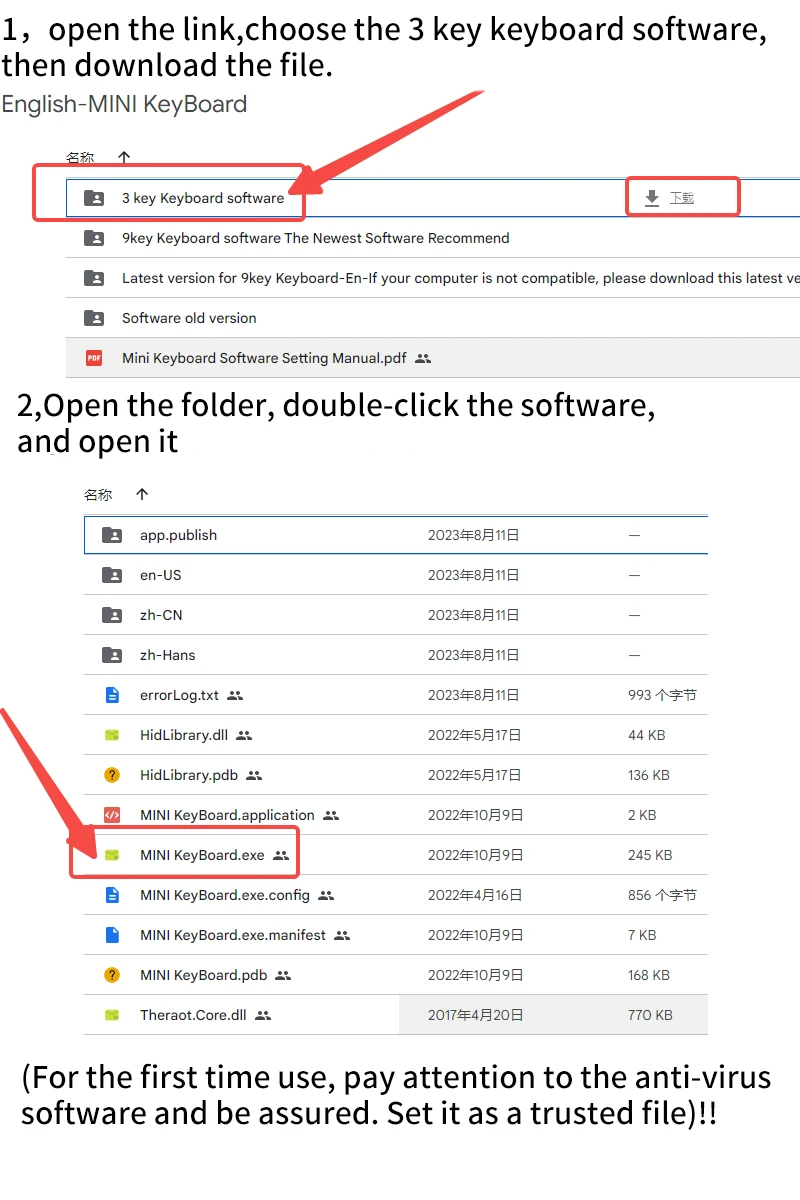
NOTICE
-
System Requirement: The setup software requires a Windows operating system.
-
LED Light Setting: The LED light can be turned off by selecting Mode 0.
-
Software Download Link: https://drive.google.com/drive/folders/1xqFDp-l5TVA_6Ojsn0rt7GqvF5EvWDCi?usp=share_link
QUESTIONS & ANSWERS
Question 1: There is no response when the keyboard is connected to the computer, or the device shows abnormal prompts.
Solution: Check whether the cable and interface are properly connected. Unplug and reconnect the device, or try using a different USB port on the computer.
Question 2: The custom software cannot be opened after downloading.
Solution: Check whether your antivirus software is blocking the program. If so, add the software to the trusted or allowed list.